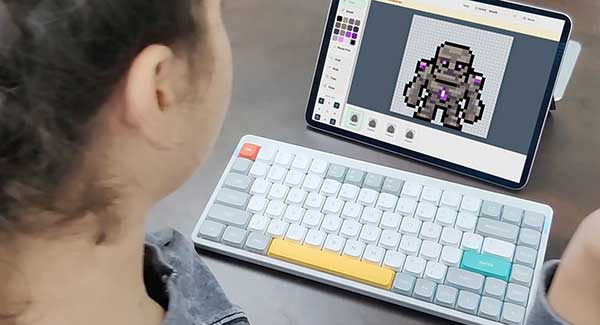
Pixel Game Lab is the game design platform Game Design Academy® built for its school programs and now licenses to schools. Students draw pixel art characters, animate them frame by frame, tell a story through levels and characters they talk to, put it all together into a game and publish it, with no coding. Teachers set up classes in the Teacher Portal and can import a Google Classroom roster in one click.
Teachers sign in with their portal username or with Google. Students sign in with a class code and tap their name.
A creative platform where kids make real, playable pixel art games. It was first used inside Game Design Academy's own classes and is now available to any school, on the web and as an app for iPad, Android and Amazon Fire tablets. Every student goes from a blank canvas to a published game.

Students draw their own hero, enemies, bosses and friends pixel by pixel in the Pixel Art Tool, with a 16-colour palette and a built-in concept art sketchpad.

Every character gets a walk, jump, attack and idle made one frame at a time: onion skin, frames per second and a live preview teach how animation really works.

In the Level Design Tool students build worlds and write the story into them: characters that talk, dialog boxes, quiz questions, trades and rewards that move the plot along.

The Game Package Tool turns the characters and levels into one game: pick the hero, order the levels, write the story, make the cover art. Then students submit it for review, learn what makes it ready, and see it go live in the Games Catalog where anyone can play it. A person reviews every game first.
Everything a teacher needs is in the Teacher Portal. Students never need an email address.

The school gets a license and teacher accounts. A teacher creates a class in the portal, or creates it straight from a Google Classroom class.
Import the roster from Google Classroom, paste a list, or type names. Student accounts are made for you, with a username and a class code.

Start a class session. Students open Pixel Game Lab, enter the school and class codes and tap their name. The session ends when you say, or after eight hours.

Assign creation tasks, leave notes on student work, mark tasks complete, build a class game together and download a class report.
Teachers can sign in to the Teacher Portal with their school Google account and import a Google Classroom roster into a class with one click. Running it again never duplicates a student.
Pixel Game Lab reads only the teacher's Google account id and email, the names of their Classroom classes, and the first and last names of the students in the class they pick. It is read-only: nothing is written back to Google Classroom, and student email addresses are never read or stored. Read our privacy policy.
Pixel Game Lab is built for children and school networks, and it follows COPPA.
Game design is a project with many parts: a hero, a story, a world, challenges, testing and improving. Students practise all of them while making something they can share.
Tell us about your school and we will follow up with licensing options, curriculum support and next steps. Already licensed? Sign in to the Teacher Portal.
Questions? Write to info@gamedesignacademy.com. Pixel Game Lab is made by Game Design Academy®, Carlstadt, New Jersey.